Thursday, 21 April 2016

E-mail

E-mail


           Assalamualaikum and hi, today i want to share about e-mail, what email exactly is? previous years before we have internet connection, we used mail to sent message  from place to place. But different with email, it used a system for sending messages from one individual to another via telecommunications links between computers or terminals using dedicated software. When i was in school i dont see the important to have an email, this is because i dont have any commitment to have the email, i just see email as a trend that i must have. But when i enter the university, i see that email is very important thing that i must have, this is when we have to communicate with others and we have to share document. when we have email, it is more easier to us to send documents or others thing with others within a minute. So i want to share to you about the structure of email and how its work and others.

There are advantages and disadvantages of the email :


Email address


• What you need is
– The E-mail address of the recipient.
– user@host
– Megataman@utm.my
– Zahirima@tm.net.my
• “utm.my" is the domain name of the mail server which handles the recipient's mail.
• “Megataman" is the user name of the recipient.
• User name and hostname are separated by "@".


Email server and client


• Email client – software / program thatcan transfer e-mail from a local host to a local e-mail server.
• Email server – software/program that can send/receive e-mail from/to other email servers.
• Mailbox – An electronic mailbox is a disk file which holds email messages.


Email software (client)

• Graphical Client (User friendly)
• Examples
– Microsoft outlook
– Thunderbird
– Netscape Mail
– etc


Text mode (UNIX - mailserv, logic server)


Email Software (Server)

Install the mail server on Linux/Unix or Windows platform.

Cc & Bcc

• Carbon Copy Section (cc)
– Send a message to more than one person, all the recipients will see the list of email addresses.

• Blind Carbon Copy Section(bcc)
– The addresses won’t be seen by the recipients.
– When email is sent to a large group of people who don’t know each other.


Attachment – MIME (Multi-purpose Internet Mail Extension)

• A protocol for transmitting non-text information across the
Internet. Basically, non-ASCII data is converted to ASCII for
transmission and then converted back at the receiver.
• A specification for automatically sending objects other than
text in email messages.
• MIME is usually associated with multimedia, such as images,
audio recordings, and movies.
• Additional hardware and helper software are usually
required.
• Common MIME-compliant mailers:
– pine, metamail, Netscape messenger, MS Outlook

ASCII Code


How does email works?


SMTP (Simple Mail Transfer Protocol)

• a protocol for sending e-mail messages between servers. Most e-mail systems that send mail over the Internet use SMTP to send messages from one server to another; the messages can then be retrieved with an email client using either POP or IMAP. In addition, SMTP is generally used to send messages from a mail client to a mail server.

  • E-mails are transferred across the Internet via Simple Mail Transfer Protocol (SMTP).
  • The mail server uses SMTP to determine how to route the message through the Internet and then         sends the message. 
  • When the message arrives at the recipient's mail server, the message is transferred to a POP3 server.    POP stands for Post Office Protocol. 
  •  The POP server holds the message until the recipient retrieves it with his/her email software. 

POP (Post Office Protocol) 

• POP was designed to support "offline" mail processing. In the offline paradigm, mail is delivered to    a (usually shared) server, and a personal computer user periodically invokes a mail "client" program    that connects to the server and downloads all of the pending mail to the user's own machine. 
• Thereafter, all mail processing is local to the client machine. 
• Once delivered to the PC or Mac, the messages are then deleted from the mail server.

 Advantages
 – Don’t have to know the name of your machine
 – POP mail server is installed on a computer always ON
 – Use Windows interface to read email

Disadvantages 
– The email at the mail server is popped to your local machine


IMAP

 • Another popular method by which users obtain their emails is called a central mail spool.
 • What is IMAP? 
 • IMAP stands for Internet Message Access Protocol. 
 • It is a method of accessing electronic mail or bulletin board messages that are kept on a (possibly      shared) mail server. In other words, it permits a "client" email program to access remote message  stores as if they were local.
 • For example, email stored on an IMAP server can be manipulated from a desktop computer at    home, a workstation at the office, and a notebook computer while traveling, without the need to    transfer messages or files back and forth between these computers. 


Key goals for IMAP include:

– Be fully compatible with Internet messaging standards, e.g. MIME.
– Allow message access and management from more than one computer.
– Allow access without reliance on less efficient file access protocols.
– Provide support for "online", "offline", and "disconnected" access modes *
– Support for concurrent access to shared mailboxes
– Client software needs no knowledge about the server's file store format.


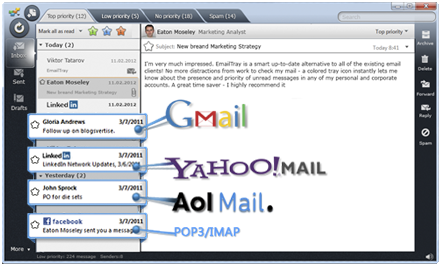
SMTP vs IMAP vs POP3


Bounced back email

• Bad user account name
• Bad domain name
• Domain name server is down for several days
• Some other malfunction (email too big)


Junk Mails 

• How can they get into your mailbox?
– From name card, letter heads, published papers.
– Use search engine in the newsgroup, bulletin boards, phone books.
– Dump a full user list in a server.

• How to stop the intrusion of Junk Mails?
 – Mail server providers joint effort
 – Filtering
 – Preview before downloading


SPAM

• SPAM is flooding the Internet with many copies of the same message
– Force to send message to people
– Junk electronic mail.

• Why cause problem?
– Cost-shifting – very cheap to send thousands of emails
– Fraud – not an advertisement subject
– Waste of others’ resources – stealing bandwidth
– Displacement of Normal Email – destroy the usefulness and effectiveness of email
– Ethics problem


WEB SEARCHNG


Assalamulaikum, for this week after 1 week holiday for mid semester break, i learn about web searching. In this new generation, i could not say that people nowdays dont use web searching when they use internet. We always use, but we dont realize how they works and how the process and more. After i learn this topic i know many thing about the web searching. It is more easier to me when i know how to put the keywords at the web to find exactly what i want. So i want to share to you how they works and tips to make your works more easier :)

Browser
• Can be defined as a software application used to locate
and display web.

• Popular browser

-IE (Internet Explorer)
-Nestcape
 -Mozilla Firefox
-Safari
-Opera
- Mosaic
-Google Chrome


Searching : Pattern Matching Queries

• It is also called Fuzzy Query.
• You can enter “ungrammatical sentences”, “incomplete
sentence fragments”, “disjoint phrases”, “nonsense
words”.
• The search engine gets a collection of keywords.
• Required keyword: Mark with “+” before the keyword.
• Prohibited keyword: Mark with “-” before the keyword.


Searching : Boolean Query

• A Boolean Query is a query that consists keywords but
with logical operators (AND, OR, NOT).
• X AND Y – will return URLs that contain both X and Y.
• X OR Y – will return URLs that contain either X or Y.
• X AND NOT Y – will return URLs that contain X and do
not contain Y.


Searching Tips

• Be natural
– Is cell phone harmful?
– Ask the search engine : “Cell phone” AND harmful

• Capitalize
– Always use lowercase
– star will search “Star, STAR, stAr, …”
– Type “Star” unless you really want to search “Star”.

• Use uncommon keywords
– The more specific results will return to you.
– Think a valid and uncommon keyword.

• Require words
– Add a “+” before the keyword.
– It will be in every match.

• Exclude words
– Use “-” before the keyword.
– In what situation should we use?

• Correct Spelling
– Beware of the differences between English and
American spellings (Color, Colour)- (color OR
colour).

• Stop words
– Ignore the most common words “the, is, …”
– “searching the web” and the search engine will ignore
“the web”.
– Add more relevant keyword.

• Use wildcards
– Use “*” in some search engines.
– “funk*”  funk, funky, funkiest

• Solve dead links
– If the search engine returns
http://www.hit.com/a/b/c.html which is a dead link.
– You can try http://www.hit.com/a/b/
– Or http://www.hit/com/a/ …

• Use different resources to find/search different kinds of information.
• Use successive query refinement to achieve effectivesearch queries.
• Think carefully for the keywords typed in the search engine.
• Use Boolean queries when you need combinations of keywords.


You can also visit this site if you want more information about web searching.
http://www.techrepublic.com/blog/10-things/10-tips-for-smarter-more-efficient-internet-searching/

But if youre the person that not really hardworking to read all that, i give you two video so that you can easily see how to do it. Click this link below to watch that video.
http://motto.time.com/4116259/google-search/


Thats all from me today , i hope this blog will help you in web searching ;)

Friday, 8 April 2016


Internet Infrastructure


     Assalamualaikum..in week 7, i just learned about internet infrastructure. In this topic i learn many things such as hierarchy of networks, internet service provider (ISP) , internet protocol and type of internet connection and access.


     What is the internet really means? Internet is the global communication network that allows almost all computers worldwide to connect and exchange information.


Hierarchy of networks

Hierarchy of networks is like from a single computer to LAN  and from LAN to ISP and from ISP to WWW. Every computer that is connected to the Internet is part of a network, even the one in our home. For example, we may use a modem and dial a local number to connect to an Internet Service Provider (ISP). At work, we may be part of a local area network (LAN), but  most likely still connect to the Internet using an ISP that certain company has contracted with. When we connect to our ISP, we become part of their network. The ISP may then connect to a larger network and become part of their network. The Internet is simply a network of networks.


Image result for hierarchy of network

Most large communications companies have their own dedicated backbones connecting various regions. In each region, the company has a Point of Presence (POP).  The POP is a place for local users to access the company's network, often through a local phone number or dedicated line. The amazing thing here is that there is no overall controlling network. Instead, there are several high-level networks connecting to each other through Network Access Points or NAPs.


Internet service provider

Internet service provider (ISP) is also known as internet access provider. It is the company that provides access to the internet.  Usually ISP provide software package, username, password and access phone number and modem. ISP are connected to one another through Network Access Points (NAPs). The example of ISP is TM.


Internet protocol

 Every machine on the Internet has a unique identifying number that is called an IP Address. The IP stands for Internet Protocol, which is the language that computers use to communicate over the Internet. A protocol is the pre-defined way that someone who wants to use a service talks with that service. The "someone" could be a person, but more often it is a computer program like a Web browser. A typical IP address looks like this: 216.27.61.137 . To make it easier for us humans to remember, IP addresses are normally expressed in decimal format as a dotted decimal number. But computers communicate in binary form like 11011000.00011011.00111101.10001001.


Image result for internet protocol


An IP address consist of 32 bits, often shown as 4 octets of numbers from 0-255.

So you can check your IP adress now http://whatismyipaddress.com/

Domain Name System ( DNS)

Internet services that translate domain name like www.google.com into numerical IP (internet protocol) address like 204.62.131.129).  The reason why we used DNS is because doman name in alphabetic and easily to remember instead of number. 


Hyper Text Transfer Protocol (HTTP)

HTTP defines how messages are formatted and transmitted and what actions Web servers and browsers should take in response to various command . For example, when we enter a URL in browser, this actually send an HTTP command to the web server directing it to fetch and transmit the requested page. 


Type of internet connection and access

  1. Dial connection
          It used a conventional dial up modem connected to standard telephone jack with regular twisted-pair cabling. Usually used with home computers . Its advantages is inexpensive hardware and ease to set up but its disadvantage is slow connection.

     2. Cable

         Used a direct connection that usually found in office and its advantage is fast.

Image result for cable for internet connection

     3. Satellite internet access

        Satellite internet access used a direct connection. It slower and more expensive than cable internet access. It required transceiver satellite outside the home or building to receive and transmit data. It  availability is anywhere there is clear view and where a satelite dish can be mounted and received signal. Performance might degrade or stop during heavy rains or snowstorm. Example such as Astro.
Image result for satellite internet access

    4. Fixed wireless

        It similar to satellite internet ,but it uses radio transmission tower instead of satellite tower. Its availability is only selected areas where service is available.

Image result for fixed wireless
   5. Broadband

     Broadband is  high-speed Internet connection . Broadband transmits data digitally, which means a modem or similar device is required on your end to translate the data packages. Several different types of broadband services are available with their own advantages and disadvantages.


  6. Mobile wireless

      Virtually anywhere cellular phone service available.

Thursday, 17 March 2016

computer networking


                                                     COMPUTER NETWORKING


            Computer network is a collection of computers and other hardware devices so that network users can share hardware, software, data and they can communicate with each other electronically.  Computer networking is connecting a computer with other computers or other devices to enable them to communicate with each other, between:

1. computer devices/equipments
2. transmission media to send/control data/signals
3. communication devices to transmit/send data from
    sources to destinations
4.  softwares


                    TYPE OF NETWORK

v  LAN
v  MAN
v  WAN
v  PAN


1. LAN

• Covers relatively small geographical area. Eg. Home,
schools, office building
• Client/ server network is example of LAN
• Allows file exchange, emails, printer sharing or accessing
the internet.


2. MAN

• Network designed to service a metropolitan area, a city or
a county
• Owned or provided by a city or network provider
• For local people’s access to internet
• Example in Malaysia? 3 network of LAN for Mid Valley City


3. WAN

• network that covers large / broad geographical area
• Ex: telecommunications network that links across metropolitan,
regional, or national boundaries) using private or public network
transports.
• In essence, this mode of telecommunication allows a business to
effectively carry out its daily function regardless of location.
• Internet: world’s largest WAN


NETWORK COMPONENT

1. Hots/End nodes

• Refers to the data source and the data destination.
• Examples:
– Personal computers
– Terminals
– Workstations

– Automatic Teller Machine

2. Transmission media

• For transmitting data and control signals
• Responsible for sending electric or signal through spesific
media. It can be bounded (wired) or unbounded (wireless)

media.


                 Unbounded (wired)
                      Bounded (Wireless)
           ·         Coaxial cable
           ·         Twisted pair
           ·         Fibre optic
                ·         Radio signals
                ·         Satellite transmission
                ·         Infrared transmission


3. Network electronic devices

• Responsible to control data from source to destination
• Provide interface between different media transmitter or for
different protocol
• To connect multiple network together or to connect
computer or network to the internet
• Examples:
– Bridges
– Routers
– Multiplexers
– Switches
– Hubs
– Gateways
– Front End Processors


4. Software/Application

• The applications at the end nodes (what is end node?)
normally involves technique and protocols
• The protocol determines the rules and procedure to send
data, terminate data, interpret data, present data and
control mistakes
• Software in the network functions to ensure data is
delivered at respective destination
• to control data transmission

5. Network architecture standard and protocols

• NAS: The blueprint of standards that define:
– How device in a network typically connect
– How the device can communicate
• To ensure interoperability between various
devices and equipment made by different
vendors.
• To enable devices made by different companies to
work or communicate with each other.

Example : TCP/IP, Ethernet (802.3), Wi-Fi
(802.11), WiMAX etc

• Network architecture is the way they are design to
communicate
• 2 types :

1. Client/Server Networks
• Client = computers that request or utilize network
resources
• Server = processing the request by client
• What is network server? Provide access to software, files
etc being shared in the network
• Retrieves file from server: download
• Transfer from client to server : upload

2. Peer to Peer Networks
• No central server
• Have direct access to other devices attached to the
network
• As long as they are declared as ‘shared devices’
• Internet peer to peer: eg. iTunes, Bluetooth between hand
phone.


NETWORK TOPOLOGY

  
                           Physical
         
                    Logical
                   Linear bus
                     Shared media
                     Star
                      Token based
                     Ring

                     Tree

                     Mesh


1. Physical topology
• The physical layout of devices on a network.or the way that the devices on a network are arranged     and how they communicate with each other
• The way that the workstations are connected to thenetwork through the actual cables that transmit       data

1. Linear Bus
􀂃 consists of central cable to which all devices are connected
with a terminator at each end.
􀂃 All nodes (file server, workstations, and peripherals) are
connected to the linear cable.
􀂃 Data transmitted through the bus line from one device to
the other
􀂃 Network cannot function when the bus line fails
􀂃 Ethernet and LocalTalk networks use a linear bus topology.
􀂃 The message is transmitted along the cable and is visible
to all computers connected to that cable.


2. Ring
• Each of the systems is connected to its respective
neighbor forming a ring.
• Sometimes called “star-wired network”
• The main difference between the bus and ring is that the
ring topology does not require termination. Because the
systems are connected all together in a loop, there is no
beginning and end point as there is with the bus topology.
• No terminator and no bounce back signal.


3. Star
• All networked devices are connected directly to the
central device (hub) / concentrator
• From central device, all network transmissions are sent
• Data on a star network passes through the hub or
concentrator before continuing to its destination. The hub
or concentrator manages and controls all functions of the
network. It also acts as a repeater for the data flow.

4. A tree (hybrid)
• Can incorporate structures such as ring, star and bus
network in one large network
• It consists of groups of star-configured workstations
connected to a linear bus backbone cable.
• Allow for the expansion of an existing network, and enable
schools to configure a network to meet their needs.


5. Mesh
• Computers have redundant physical connections to one
another
• When the mesh network is a WAN (such as the Internet),
or a LAN that is divided into multiple subnets, routers make
decisions about which of the multiple available paths will
be taken.
• Decide based on which one is the most ‘effective’


2. Logical topology
• how the systems communicate across the physical
topologies
• the way that the signals act on the network media, or the
way that the data passes through the network from one
device to the next without regard to the physical
interconnection of the devices.
• 2 types:

1. Shared media topology

• In a shared media topology, all the systems have the
ability to access the physical layout whenever they need it.
• Advantage : the systems have unrestricted access to the
physical media.
• Disadvantage : Collisions - If two systems send information
out on the wire at the same time, the packets collide and
kill both packets. If add more systems to the network, there
is a greater opportunity for collisions.
• To help reduce the number of collisions, many
networks are broken up into several smaller
networks with the use of switches or hubs, and
each network is then referred to as its own
collision
• Example: Ethernet


2. Token-based topology

• Have a token that travels around the network.
• When a system needs to send out packets, it grabs the
token off of the wire, attaches it to the packets that are
sent, and sends it back out on the wire.
• As the token travels around the network, each system
examines the token.
• When the packets arrive at the destination systems, those
systems copy the information off of the wire and the token
continues its journey until it gets back to the sender.
• When the sender receives the token back, it
pullsthe token off of the wire and sends out a new

empty token to be used by the next machine.
• Advantage : Do not have the same collision problems that
Ethernet-based networks do because of the need to have
possession of the token to communicate.
• Disadvantage : Latency – Because each machine has to
wait until it can use the token, there is often a delay in
when communications actually occur.
• Token-based network are typically configured in physical
ring topology because the token needs to be delivered
back to the originating machine for it to release.
• The ring topology best facilitates this requirement


Wednesday, 16 March 2016

WIRELESS TECHNOLOGY

Wireless technology


This week I learn wireless technology which is different with last week. This technology does not use wire as the medium of connection. This technology use  signal (radio) signals to send data through the airwaves between devices. Wireless technology is generally used for mobile IT equipment. It encompasses cellular telephones, personal digital assistants (PDA's), and wireless networking. For the example, GPS units, garage door openers and or garage doors, wireless computer mice and keyboards, satellite television and cordless telephones are the technology that’s use wireless technology.

Cisco’s Wireless data initiatives:
·         Point-point/ Multipoint wireless
·         Wireless LAN
·         Wireless local loop
·         Mobile cellular voice/data communications


There are many uses of the wireless technology that  helps our daily life to be more easier. Mobile users can use their cellular phone to access e-mail anywhere and anytime. Travelers with portable computers can connect to the Internet through base stations  installed in airports, railway stations, and other public locations. At home, users can connect devices on their desktop to synchronize data and transfer files.

Type of wireless technology

ü  Wireless wide area networks (WWANs)
ü  Wireless metropolitan area networks (WMANs)
ü  Wireless local area networks (WLANs)
ü  Wireless personal area networks (WPANs


This is the example of the type wireless technology:
           
1.Infra Red
•  Do not use signals in radio frequency
•Send data as infrared light rays in short distance
•IrDA (Infrared Data Association) is an industry standard for wireless communication with infrared light.
•Many laptops sold today are equipped with an IrDA-compatible transceiver that enables communication with other devices, such as printers, modems, LANs, or other laptops. The transfer speed ranges from 2400 bps to 4 Mbps


2.Wireless local area networks (WLANs) , WiFi
•WLANs are based on the IEEE 802.11 standard.
•IEEE 802.11 standard is a standard that has been developed by IEEE (Institute of Electrical and Eletronic Engineers) to differentiate between the various technology families
•There are three physical layers for WLANs: two radio frequency specifications (RF - direct sequence and frequency hopping spread spectrum) and one infrared (IR).
•Wi-Fi underlying this technology
•WLAN configurations vary from simple, independent, peer-to-peer connections between a set of PCs, to more complex, intra-building infrastructure networks.
•Wireless solutions :
i. A point-to-point solution is used to bridge between two local area networks, and to provide an alternative to cable between two geographically distant locations (up to 30 miles).
ii. Point-to-multi-point solutions connect several, separate locations to one single location or building


 3.Broadband wireless.
•Broadband wireless access is a technology aimed at providing high-speed wireless access over a wide area from devices such as personal computers to data networks.
•According to the 802.16-2004 standard, broadband means 'having instantaneous bandwidth greater than around 1 MHz and supporting data rates greater than about 1.5 Mbit/s
•It is planned to be used in the next few years
and is estimated to have a range of
50km (30 miles).


4.Bluetooth,
•Bluetooth is an industrial specification for wireless personal area networks (PANs).
•Designed for very short range <10 m
•Connect and exchange information between devices such as mobile phones, laptops, PCs, printers, digital cameras and video game consoles over a secure, globally unlicensed short-range radio frequency.
•Data speed up to 3Mbps

5.WiMax
• To extend the range of wireless network
•Speed up to 70Mbps, Range 30 miles
•Provides access to internet access to fixed location with larger coverage


I also learn about the generation of mobile phone. I hope this picture make you understand the evolution of mobile phone from 1G to 4G.


Menjual Sayur Dari Tanaman & Tanaman Jagung

Haiiii....... korang ingat lagi tak pada awal Cikgu Kachak post pasal apa 😏 ? Cikgu post pasal tanaman cikgu iaitu sayur yang cikgu tana...